Event Intelligence Cloud

run.events is an Event Intelligence Platform – what does that mean?

An Event Intelligence Platform is event management software for event organisers, with AI built into every product, not added as a separate tool.

Hosted in the EU. Never trained on your data.

Request a demo

What an Event Intelligence Platform means in practice

In run.events, this AI is called the Event Intelligence Cloud. It analyses attendee profiles, suggests matches, forecasts attendance, answers attendees' questions and runs the AI agents you create for your own event processes. The AI features you use depend on the run.events products you work with.

Unlike legacy event platforms, run.events is built on AI: it is the foundation of every product, not an add-on and much more than a chat. It connects every event interaction and signal, and gives organisers, attendees, sponsors and speakers a better experience.

Eight examples from daily event work

Know more about your attendees than their registration forms tell you

Attendee analysis

The Event Intelligence Cloud analyses attendee profiles (GDPR-compliant, with opt-in). It identifies each attendee's role (which can be much more detailed and nuanced than buyer or seller) and explains why. It finds their interests, each with a confidence score and a trend. As long as the attendee has opted in, the profile stays with them across all your events, so it becomes more accurate with every event they attend.
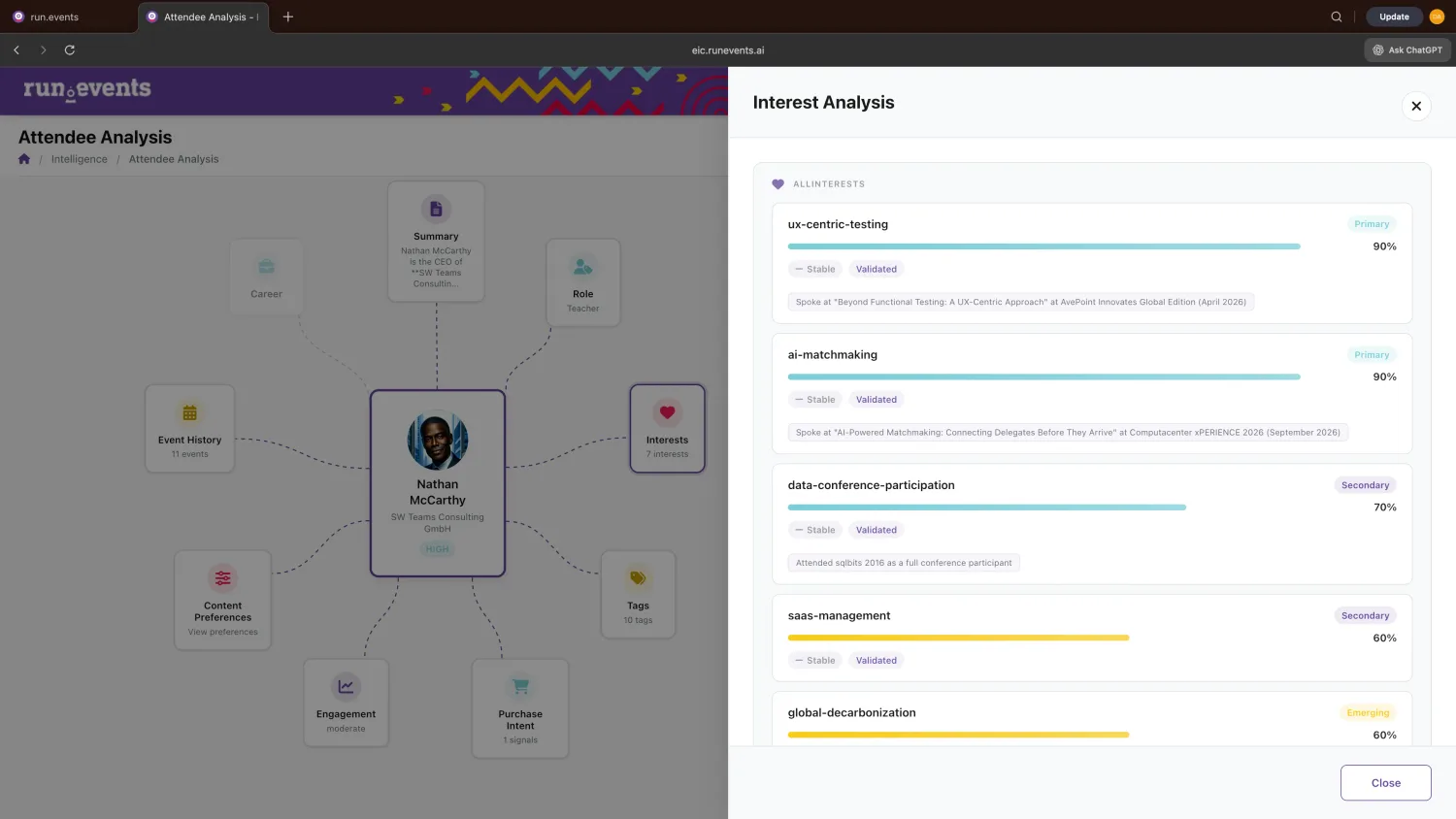
Attendee analysis in run.events: an attendee's role, interests and purchase intent, next to the interest analysis with confidence scores.

Match attendees, sponsors, exhibitors and products

Matchmaking

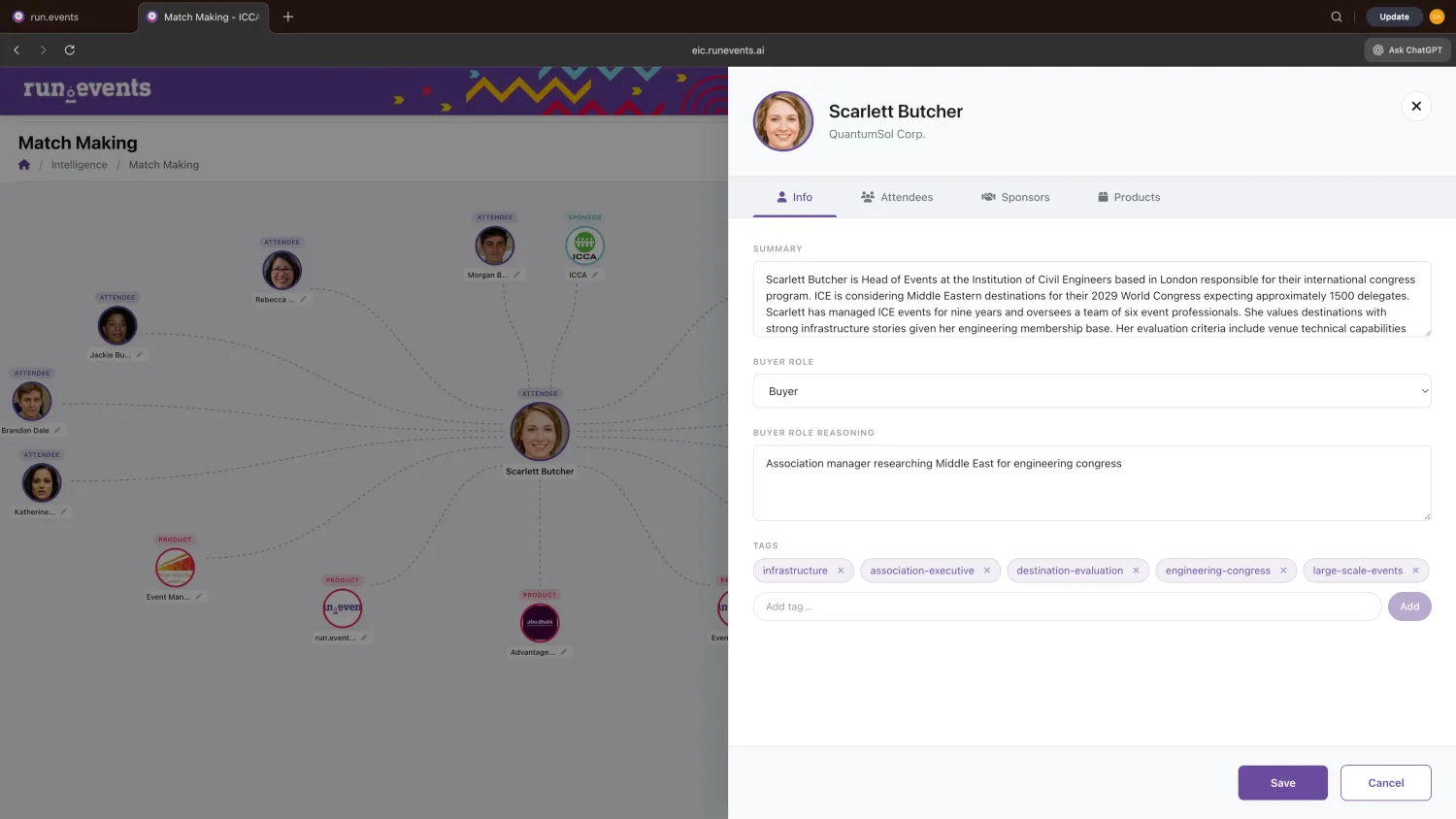
The AI suggests matches: attendees with other attendees, attendees with sponsors and exhibitors, and attendees with specific products. It recommends sessions to each attendee and gives sponsors a list of the attendees who fit their offer. Every match comes with a short explanation and talking points. You can review and edit the matches in a network diagram before they appear in the app, on the event hub site and in the sponsor dashboards.

Matchmaking in run.events: one attendee's matches in a network diagram, next to the attendee's AI summary, buyer role and tags.

See who came to your event this year, and how many will come next year

Intelligence and forecasting

Ask run.events questions about your events in your own words and in your own language. The answer comes as a chart with a short explanation. You can ask, for example, how ticket sales compare with last year, where registrations come from, how many attendees return and which groups are drifting away.

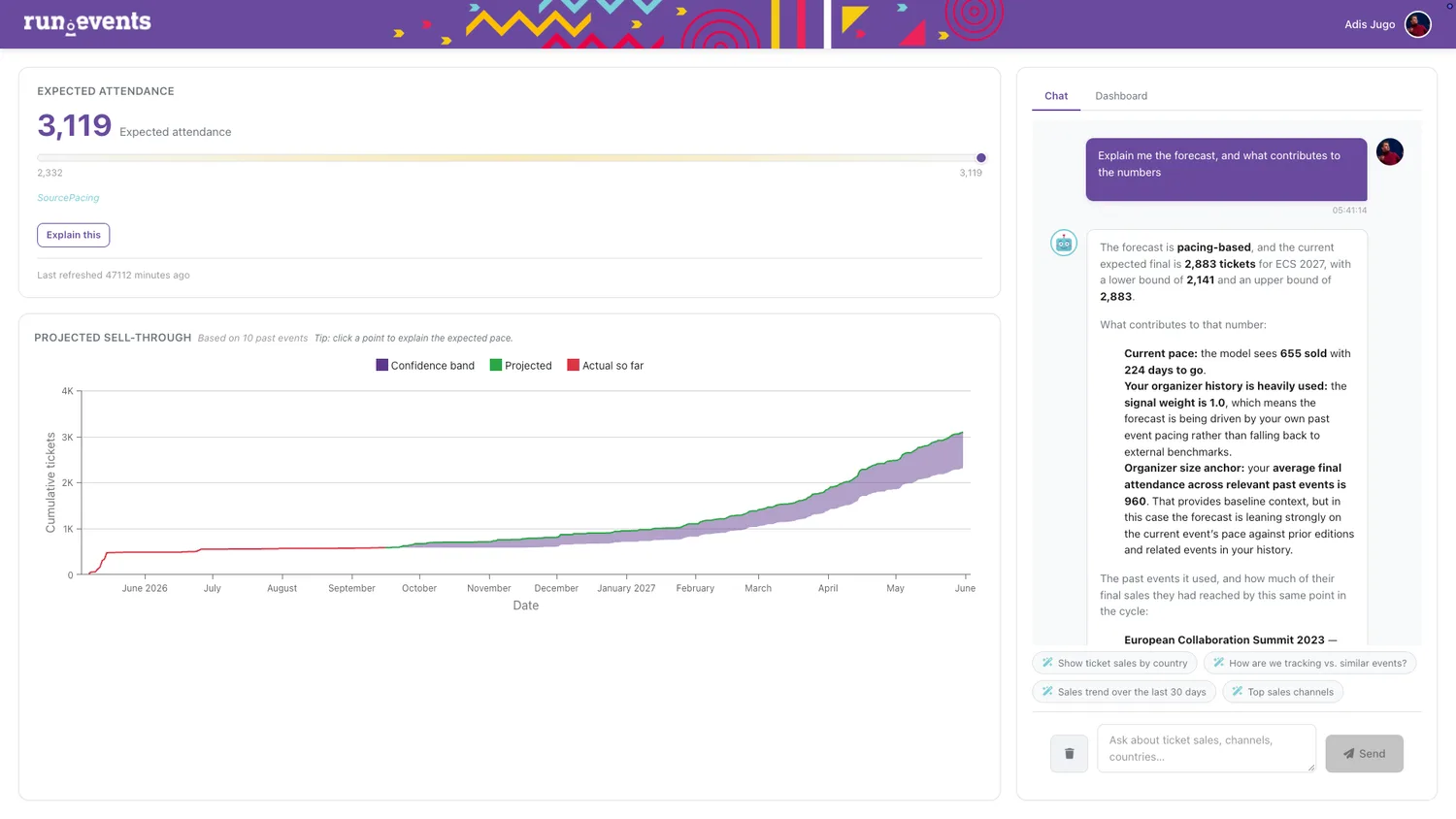
Weeks before the doors open at your next edition, the AI forecasts your final attendance, with a confidence range. The forecast is based on how comparable past editions sold, and the AI explains how it arrived at the figure. If there is not enough comparable history, it says so. If sales slow down, the forecast shows it weeks before the event.

Attendance forecast in run.events: expected attendance, projected ticket sales with a confidence range, and the AI explaining the forecast in a chat.

Connect AI assistants and your other systems to your event data

Integrations

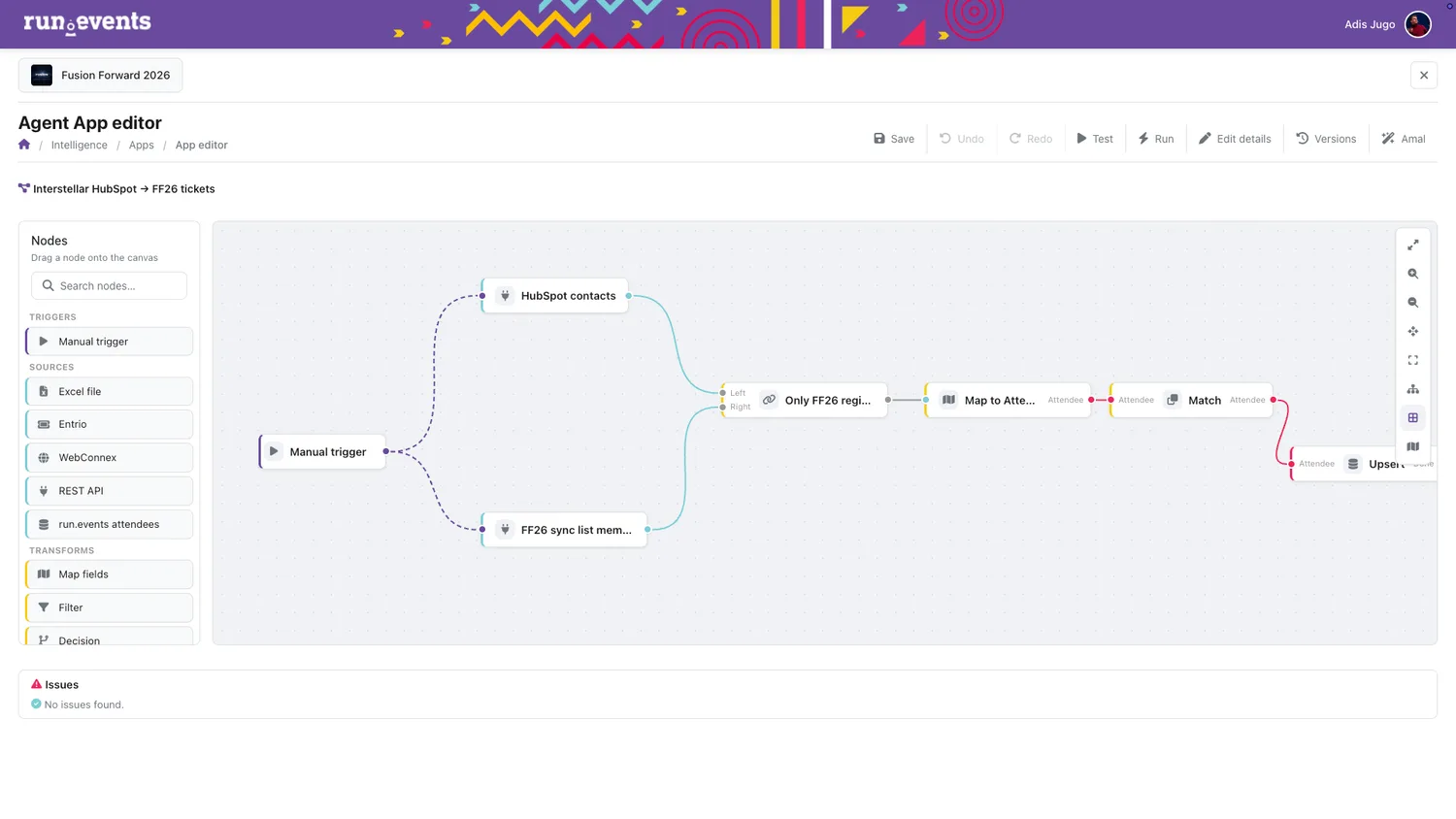
Every event you publish in run.events is automatically an MCP server. MCP (Model Context Protocol) is the standard that AI assistants use to connect to data in other systems. External AI assistants such as Mistral, Claude and ChatGPT, and your company's own AI agents, can read the live event data directly: the agenda, sessions, speakers, ticket types, sponsors and exhibitors. Your other systems can connect through the public run.events API, and the AI can also build those connections for you.

A flow editor in run.events with a flow that connects HubSpot contacts to the event's attendees.

Let AI do the routine work, while you keep control

Time saver

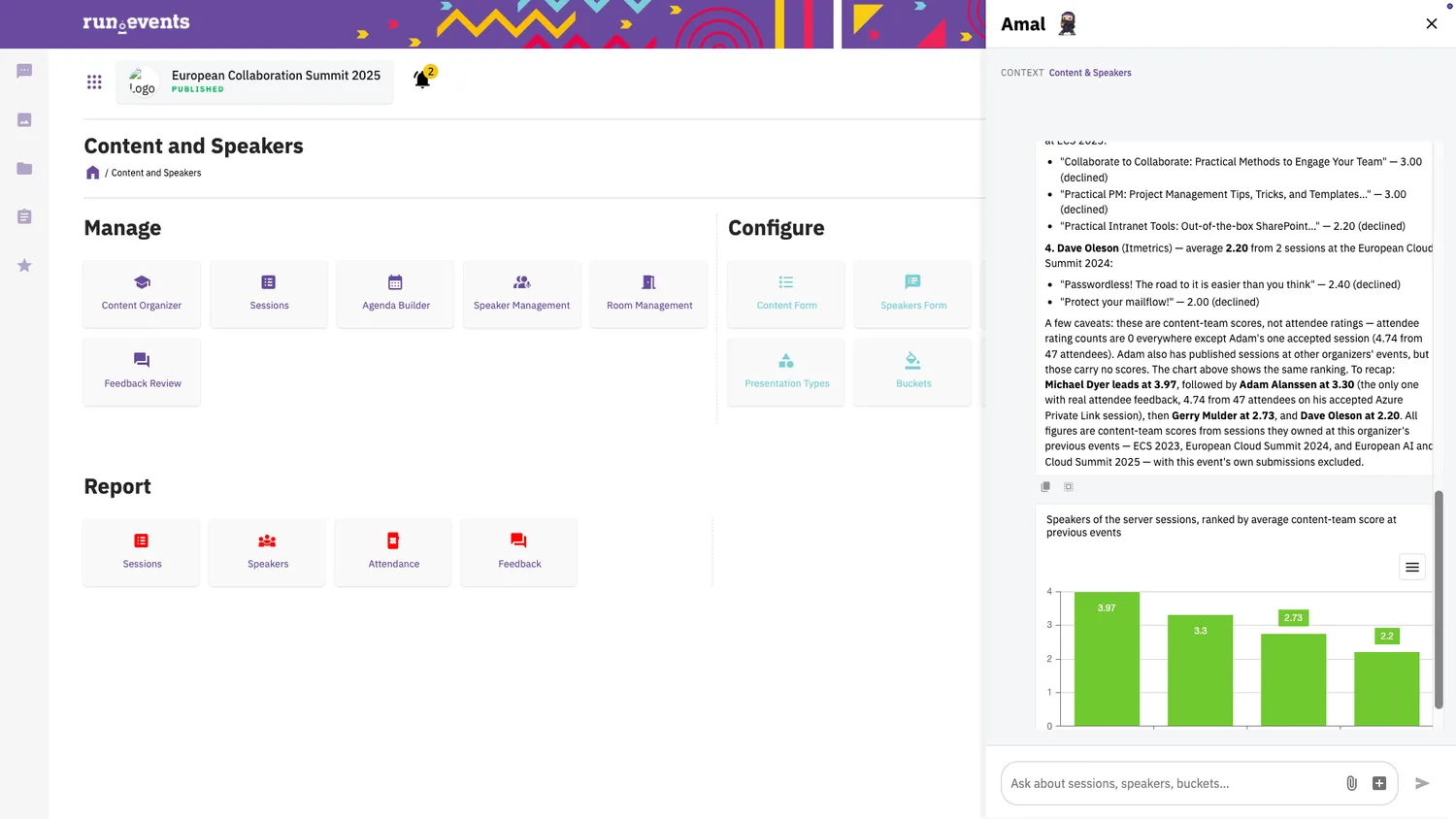
Amal, the run.events AI assistant, works in the screen you have open. In Abstract and Agenda Management, for example, you can ask which speakers your content team rated highest at your previous events. The AI also detects duplicate sessions among the submissions. In Audience Management, the AI matches the payments on your bank statements to orders and invoices. It applies the clear cases itself and leaves uncertain ones for your review.

Amal, the run.events AI assistant, in Abstract and Agenda Management: speakers ranked by their content-team scores at previous events, with a chart.

Pages and emails from a short description

Creative work

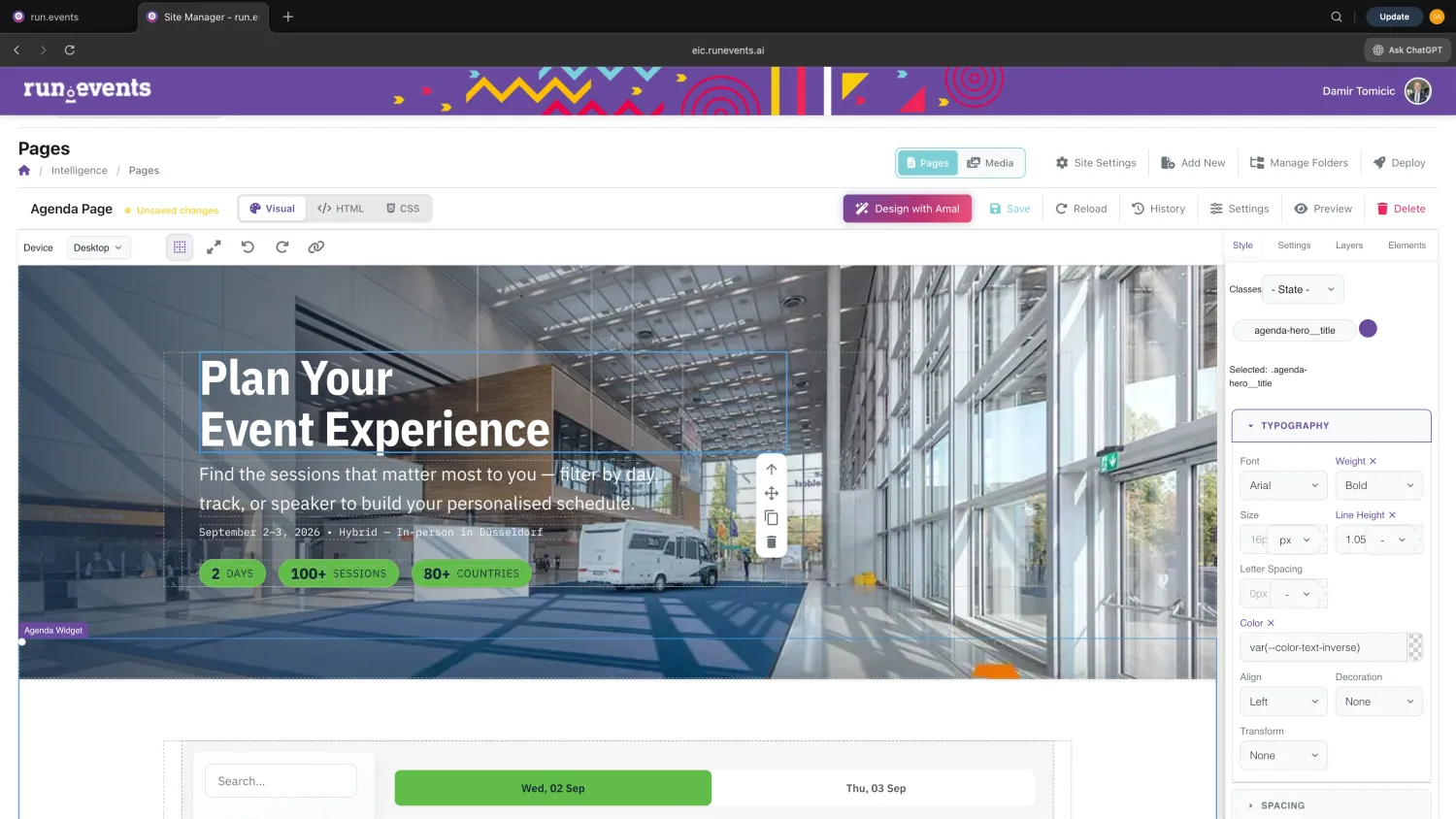
Describe the page or email you need, and run.events creates it in your event's branding. Pages already contain your event data: the agenda, speakers, ticket types and sponsors. You can refine the result in conversation with Amal or in the visual editor before you publish or send it. Pages come with what search engines need, such as page titles, descriptions and readable web addresses, and can be translated into your event's languages.

The AI page builder in run.events: the agenda page of an event website in the visual editor, with the “Design with Amal” button.

Model your event processes exactly as you need them and create AI agents that execute them

Create your own AI agents: AI-driven processes

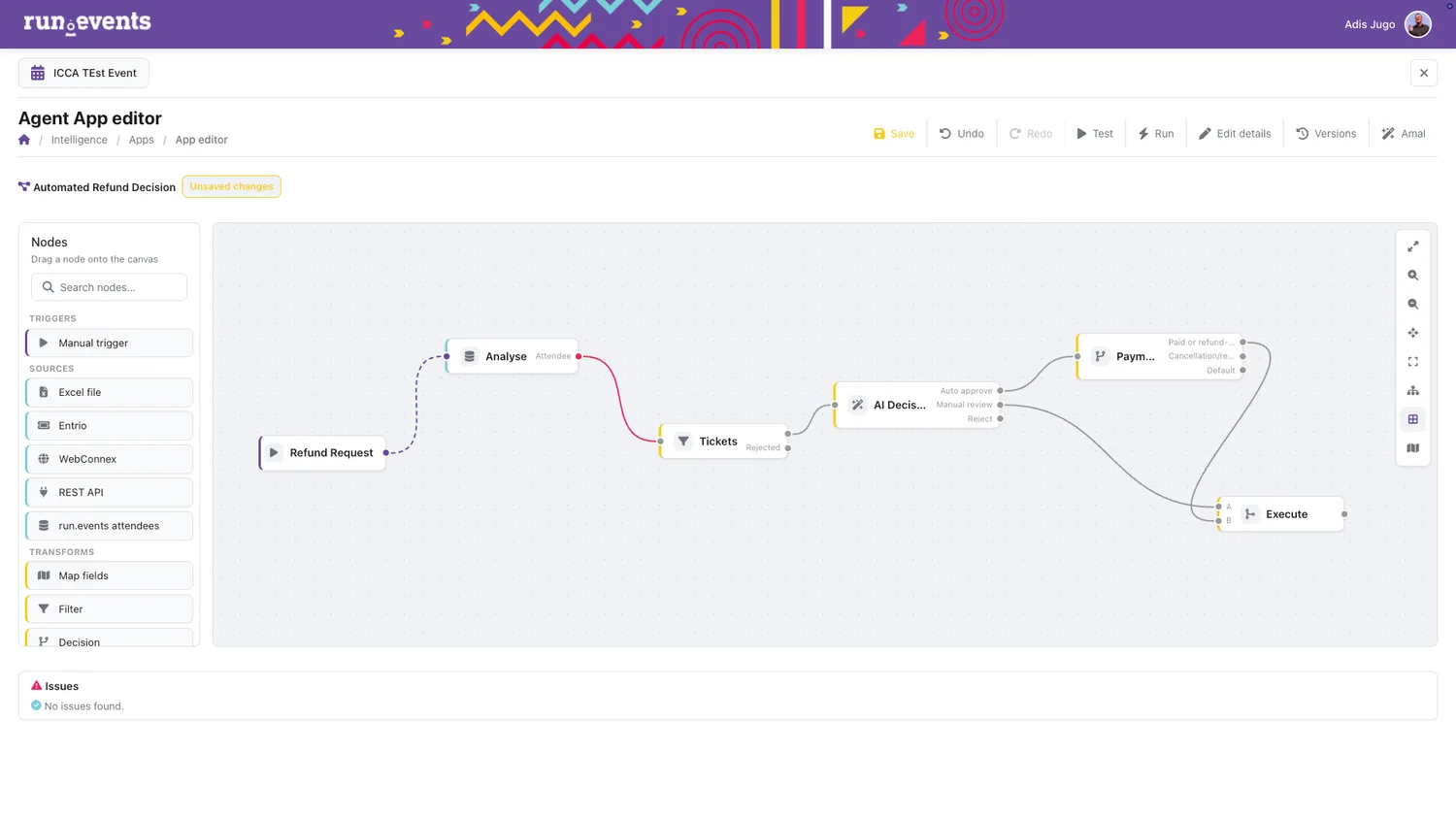
There is no single event management platform in the world that can support out of the box all the processes that are specific to your events, but run.events is the only one that lets you build them. Use AI to describe and model your processes and create AI agents which will then take the repetitive work from you – those agents effectively become your extended workforce, your employees.

An AI agent in run.events with an automated refund decision flow.

Your first line of event support

Event support

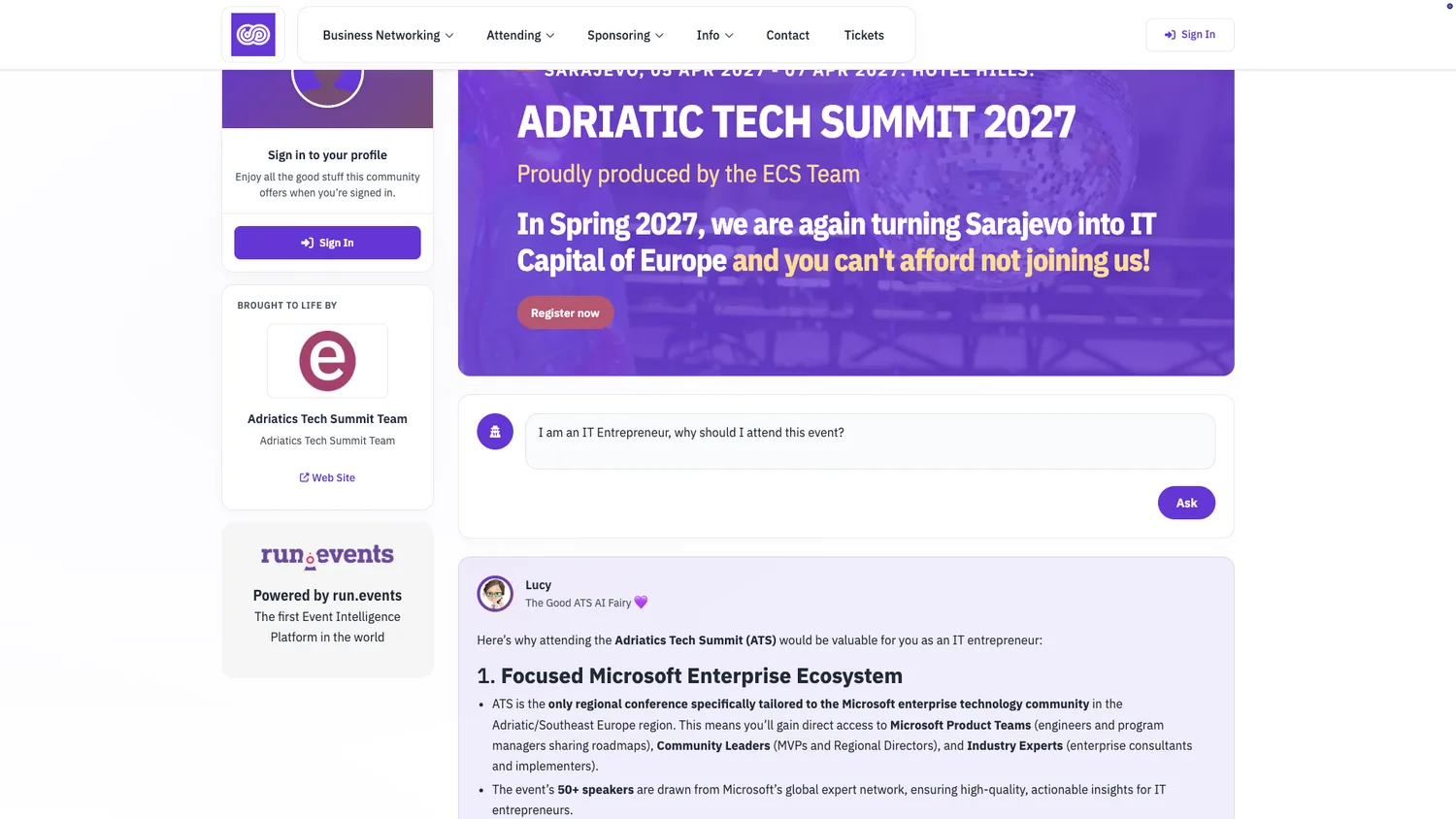
The run.events AI support assistant on your event hub site and in the app answers attendees' questions day and night, from your FAQs and knowledge documents. It makes clear that it is an AI and hands complex questions to your team. You can review its conversations, and you see which questions it resolved and where your information has gaps.

The AI support assistant on an event hub site, answering a visitor who asks why they should attend.

The seven layers of the Event Intelligence Cloud

  1. Enrich

    Enriches every event data entity

  2. Connect

    Maps relationships across your event

  3. Inform

    Analyses signals, keeps you informed

  4. Act

    Takes on tasks, under oversight

  5. Model

    Models your own event processes

  6. Create

    Creates content from your data

  7. Protect

    Keeps everything safe and compliant

The Event Intelligence Cloud and your data

The Event Intelligence Cloud is built for the GDPR and the EU AI Act.

  • Hosted in the EU.

    All run.events AI operations run on cloud infrastructure in the EU. The default model is Mistral, a European model hosted in the EU, with no data transfer to the US.

  • Your choice of AI model.

    If your organisation works with another model, run.events can use Anthropic Claude, OpenAI GPT, Google Gemini or an open-source model instead. If you bring your own AI, you decide where its data is processed.

  • No AI training, and GDPR rights built in.

    Your event data is never used to train our AI agents and models. Access, export, deletion and portability of personal data are built in, as the GDPR requires.

  • Human review, attendee control and audit trails.

    You can review and edit everything that AI co-creates: matches, emails, pages and session recommendations, before they are published or sent. Attendees can switch each AI feature on or off with one click and can see how its suggestions are made. Audit trails record every AI operation and data access for your compliance reporting.

Questions about the Event Intelligence Cloud

What does run.events mean by an Event Intelligence Platform?

An Event Intelligence Platform is event management software for event organisers, with AI built into every product, not added as a separate tool. run.events is an Event Intelligence Platform, and its AI foundation is called the Event Intelligence Cloud.

Is the Event Intelligence Cloud a separate product?

No. The Event Intelligence Cloud is the AI inside the run.events products. Which AI features you use depends on the products you work with. How the products are priced is on the pricing page.

Which AI model does run.events use?

By default, run.events uses Mistral, a European model hosted in the EU. You can choose Anthropic Claude, OpenAI GPT, Google Gemini or an open-source model instead.

Is our event data used to train AI agents?

No. Your event data is never used to train AI agents and models.

Can we check what the AI produces before attendees see it?

Yes. Matches, emails, pages and session recommendations can be reviewed and edited before they are published or sent. Text and images that the AI moderation flags wait for a moderator's decision.

The support assistant answers attendees directly from your FAQs and knowledge documents. You can review its conversations later, and it hands complex questions to your team.

Can attendees switch the AI off?

Yes. Attendees can switch each AI feature on or off with one click, and they can see how its suggestions are made.

Which AI assistants can read our event information?

Every event you publish in run.events is automatically an MCP server.

MCP (Model Context Protocol) is the standard that AI assistants use to connect to data. Through it, external AI assistants such as Mistral, Claude and ChatGPT, and your company's own AI agents, can read your event's live information (the agenda, sessions, speakers, ticket types, sponsors and exhibitors) and search the agenda, sessions and speakers.

Public event information is open to every connection; for the rest of this information, the event's API keys decide what each connection may see.

The Event Intelligence Cloud brochure

The PDF contains the examples, the seven layers and the section on how the Event Intelligence Cloud handles your data. You can share it with your team, stakeholders or sponsors. The download does not ask for an email address.

See all run.events AI features and how run.events is different from legacy event platforms in a demo

In the demo, we show you the examples from this page in run.events itself and answer your questions about your own events.